Claude Code sessions disappeared after switching accounts
Separate index per account. The transcripts never moved and were never account-specific.
Recoverable
Claude Session Manager reads your Claude Code .jsonl transcripts straight off the
drive instead of trusting any app's list of them — so you can find the sessions your sidebar
lost, relink the ones that open blank, and back the whole history up before you need it.
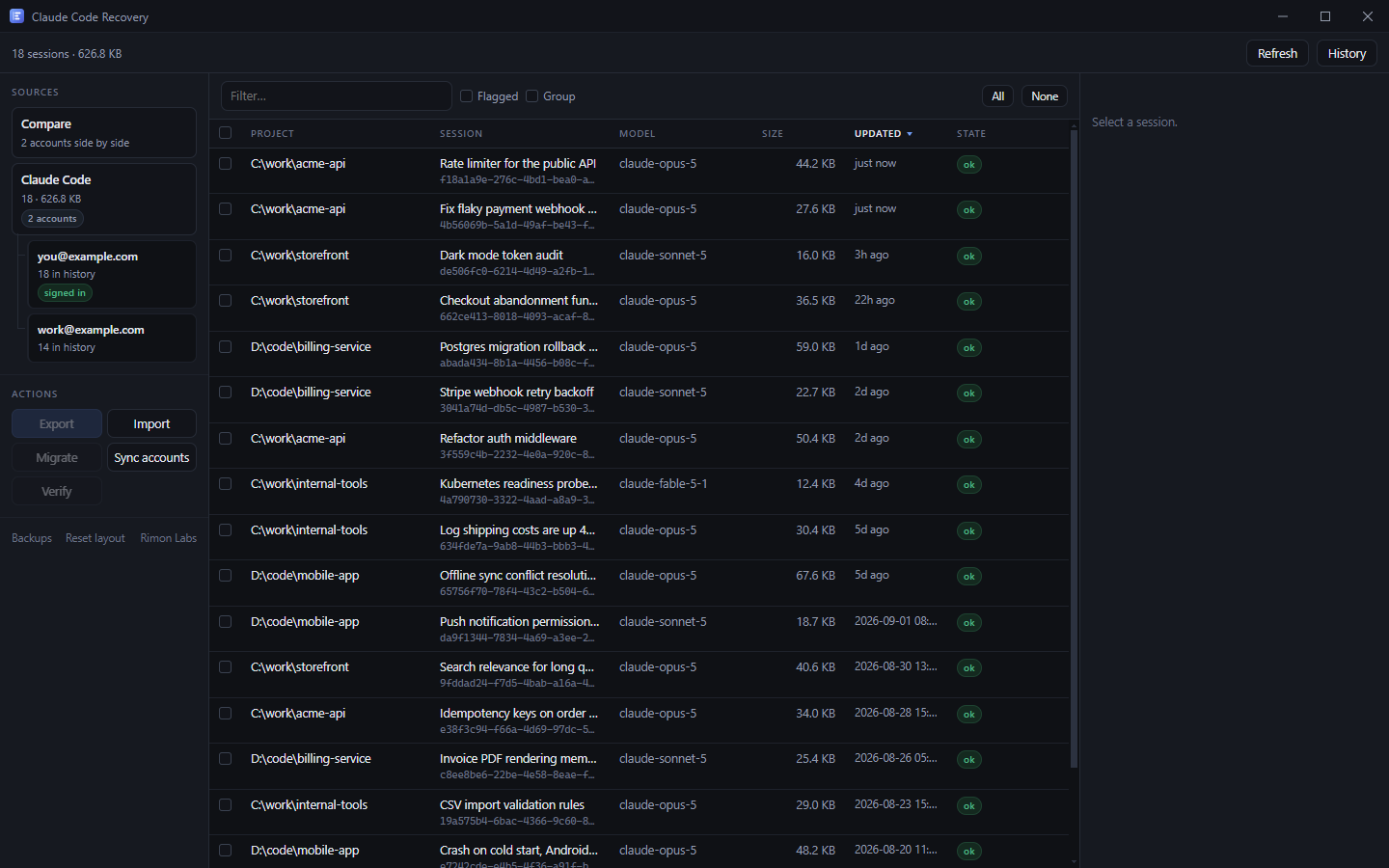
It walks ~/.claude/projects and reads each transcript directly. Nothing is
taken on faith from an index, which is why sessions your sidebar has lost still turn up here.
.jsonl yourself.
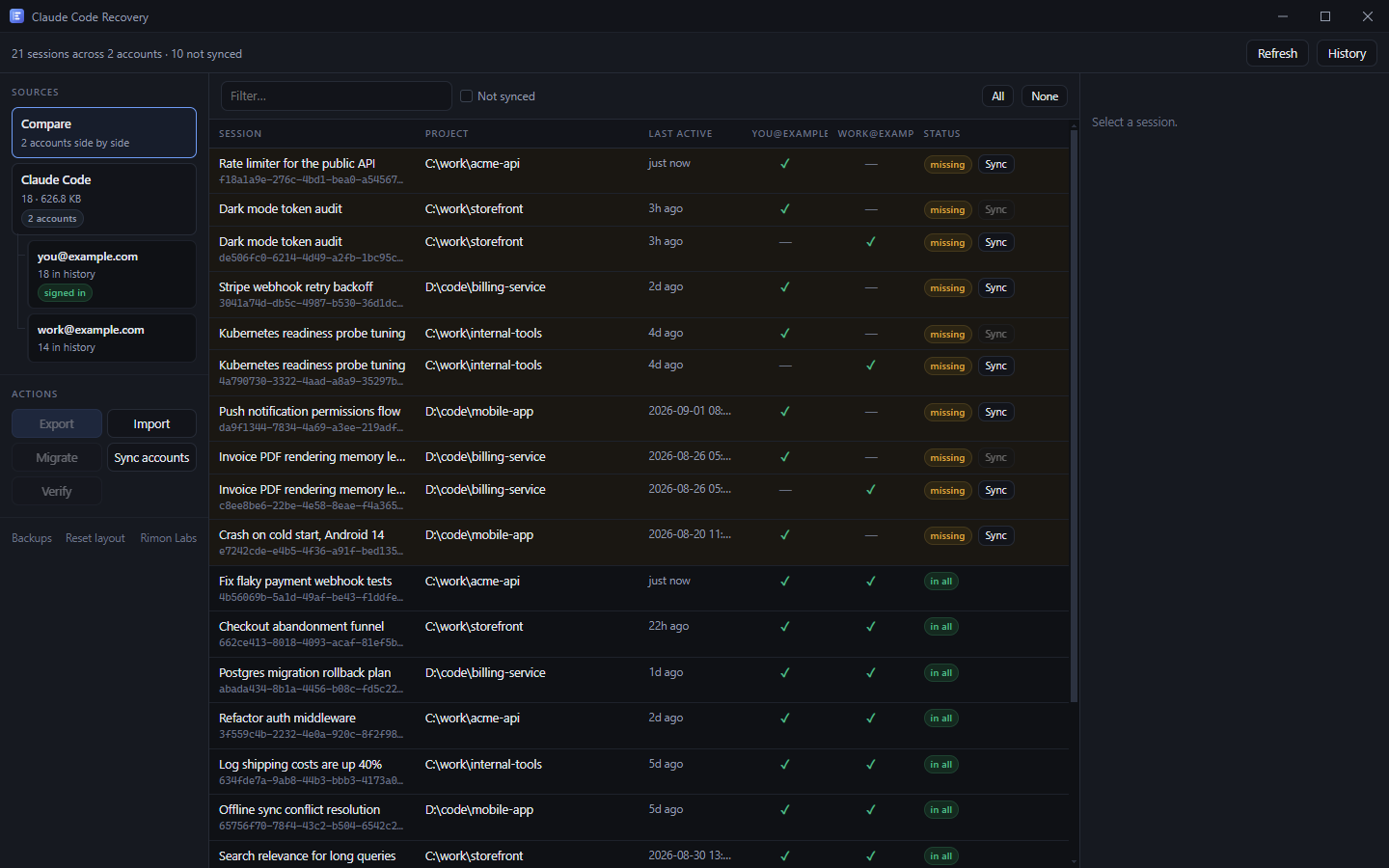
Hit a usage limit, switch accounts, and your history appears to vanish. It did not — Claude Desktop keeps a separate list per account. Compare puts them side by side.
The record kept its title but lost the pointer to the transcript. Scan & Repair searches every transcript for that title and offers the match — one row per record, nothing hidden behind the Fix button.
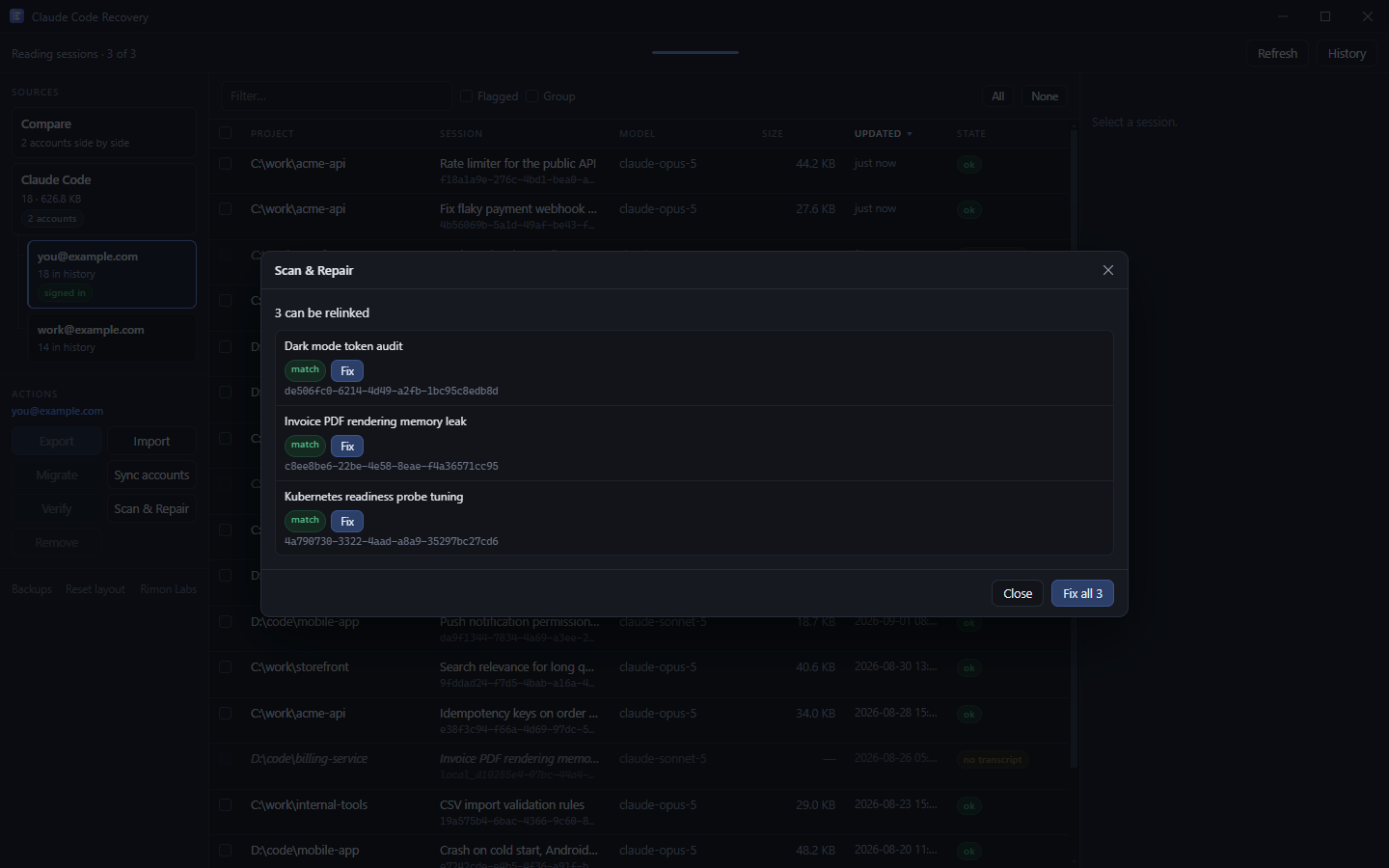
Two of these it cannot fix, and it says so rather than wasting your evening.
Separate index per account. The transcripts never moved and were never account-specific.
RecoverableThe record kept its title and lost its pointer. Scan & Repair finds the file by that title.
RecoverableSame shape: the index went, the transcripts stayed. Check the folder before doing anything else.
Usually recoverableOften no index record was ever written. They show up here, and can be checked and exported.
Visible and exportableRetention removes old transcripts (cleanupPeriodDays). Once the file is gone it is gone. Raise the setting and export today.
/resume says "No conversations found"That is the CLI reading its own index, which this app does not write to. It can still confirm the files survived.
Not fixed hereWorth knowing whether you use this app or not. A session is two separate files, and almost every "my history is gone" report is the second one failing while the first sits untouched.
%USERPROFILE%\.claude\projects\<encoded-path>\<session-id>.jsonl — the
transcript itself, one JSON object per line. This is the file that matters.%APPDATA%\Claude\claude-code-sessions\<account>\<org>\local_<uuid>.json
— title, project path, and a cliSessionId pointing at the transcript.%LOCALAPPDATA%\Packages\Claude_*\LocalCache\Roaming\Claude\C:\work\acme-api becomes C--work-acme-api. Past 200
characters it is truncated and hashed..jsonl that no account lists — common for sessions started in the CLI
or the VS Code extension. They are invisible in the Code tab and perfectly
readable on disk.cleanupPeriodDays in your Claude Code settings decides how long
transcripts survive. This is the one that causes real, unrecoverable loss.Claude Code session recovery is mostly this one distinction. To recover a Claude Code session you thought was gone, you rarely need to recover a file at all — you need to find the transcript that was never lost and point a record back at it. That is what this app does, and it is why it deliberately does not rebuild Claude's own index or write to the CLI's resume list. It reads the transcripts, repairs the desktop records that lost their pointer, and exports a Claude Code session backup you keep yourself.
You are pointing a v0.1.0 binary at the only copy of something you care about. Here is the mechanism, not an adjective.
The preview issues a single-use token. Execution without it is refused, so a dry run cannot be skipped and a stale plan cannot be replayed.
Anything about to be overwritten is copied to the app's own backup folder first, with a note of where it came from.
A crash mid-write leaves the original intact rather than a half-written file.
An imported file is matched against its checksum and parsed for integrity before it replaces anything. A damaged source is refused.
Every change is appended to a plain-text JSONL log. You do not need this app to audit this app.
It is called Remove, it unlinks a session from one account's list, and it never touches the transcript. Volunteered here rather than buried.
Unconvinced? Run Export first. Scanning and exporting only read — you get a zip of your history without a byte written to Claude's files.
The Windows installer is not attached to the release yet — the publish job failed and
left only a stray .blockmap behind. Until it lands you can
build from source. This
notice comes down the hour the binary is up.
src/core/safety.js, which every write goes through.Every conversation is a .jsonl transcript under ~/.claude/projects, in a folder named after the working directory with every non-alphanumeric character replaced by a dash. Claude Desktop keeps a separate list of those sessions as local_<uuid>.json files under claude-code-sessions. Two different sets of files, and nothing reconciles them.
Usually just missing from the list. The sidebar is built from index records while the conversations live in separate transcript files, so when a record is lost the session vanishes from the sidebar with the transcript untouched on disk. Open ~/.claude/projects and look at the file sizes to check — you do not need this app to find that out.
Claude Desktop keeps a separate index per account, under claude-code-sessions/<account>/<organization>/. Signing into a second account gives you a second, empty list. Your transcripts never moved and were never account-specific; only the list of them is.
The index record holds the title and a pointer called cliSessionId naming the transcript file. When that pointer is missing the sidebar still draws the row from its cached title, but there is nothing to load. Scan & Repair searches the transcripts by title to find the file again.
No. There is no account, no sign-in and no telemetry. The only network request the app makes is a version check against GitHub, which can be switched off. Everything else happens on your disk.
Every write shows a preview first that cannot be skipped, anything replaced is backed up before the write, and every change is appended to a plain-text audit log. Copying between accounts only adds. The one control that removes anything is called Remove, it unlinks a session from one account's list, and it never touches the transcript.
Reasonable question. Start with Export: scanning and exporting only read, so you get a zip of your history without a byte written to Claude's files. If you never press anything else, you have still gained a backup.
Not yet. The code paths for both are implemented and unit-tested — the app knows where Claude keeps its files on each platform — but no build has ever been produced or launched on either. Only the Windows build is real today.
Export writes every session you select into a single zip, carrying the original bytes of each transcript plus a checksum for each one. Import reads it back on another machine. Export only reads, so it is the safe thing to do first — and doing it before Claude Code's retention period removes anything is the only defence against the case nothing can fix.
A .jsonl transcript on disk that no account lists in its index. Sessions
started from the CLI or the VS Code extension often never get a record written, so
they never appear in the Claude Desktop Code tab. This app reads every transcript
regardless of who listed it, so orphans show up, can be checked for damage, and can be
exported.
No, and that is deliberate. It repairs desktop history records that lost their pointer
to a transcript, which is a different and much narrower thing. It does not write to Claude
Code's own resume index, so it will not change what /resume or
claude --continue offer you.
Export on the old machine, copy the zip across, Import on the new one. Import shows you exactly what it would write before it writes it, refuses anything whose checksum does not match, and never overwrites an existing transcript without backing the old one up first.